Forgot SSO ID or Password? Recover Your Rajasthan SSO Account
Regain access in minutes — recover a forgotten SSO ID, reset a lost password, or restore access when your registered mobile or email is gone. Every official method is free.
SSO ID SMS
RJ SSO
Send to
9223166166
Cost
Free
Helpdesk
0141-5153222
Your data stays safe
Recovery only restores access to your existing account. Your application history, linked services, and saved documents remain completely intact.
Part 1 — Recover a forgotten SSO ID
Two ways to get your SSO ID back: the official portal, or a quick SMS that needs no internet.
SSO ID by SMS (fastest)
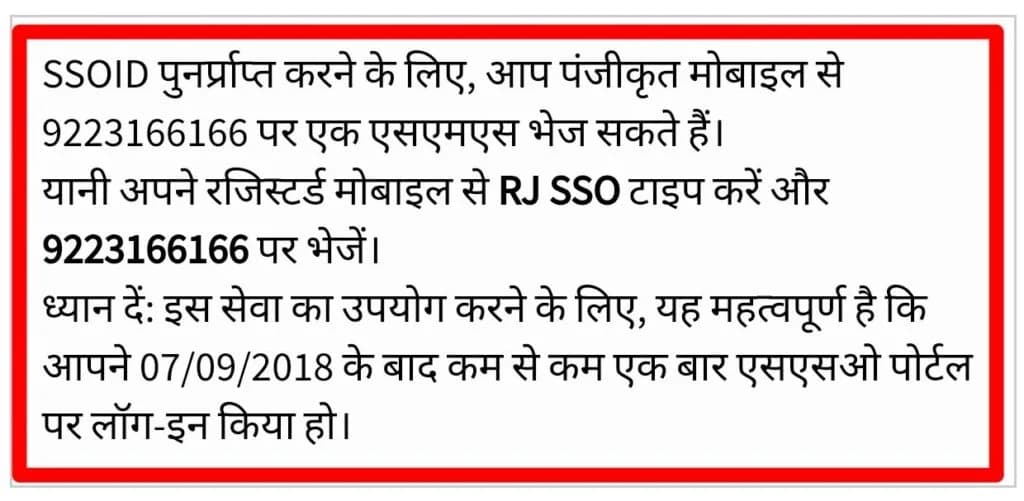
From your registered mobile number, send the exact text RJ SSO to 9223166166. You get an instant reply with your SSO ID.
SMS to send
RJ SSO→9223166166
Send from your registered number
The SMS must come from the mobile number registered with your SSO account. A message from any other number will not return your ID.
Type it exactly
Write RJ SSO in capital letters with a single space, exactly as shown. A different spelling or spacing will not work.
SSO ID on the portal
Prefer the website? Recover your Digital Identity in four steps:
1
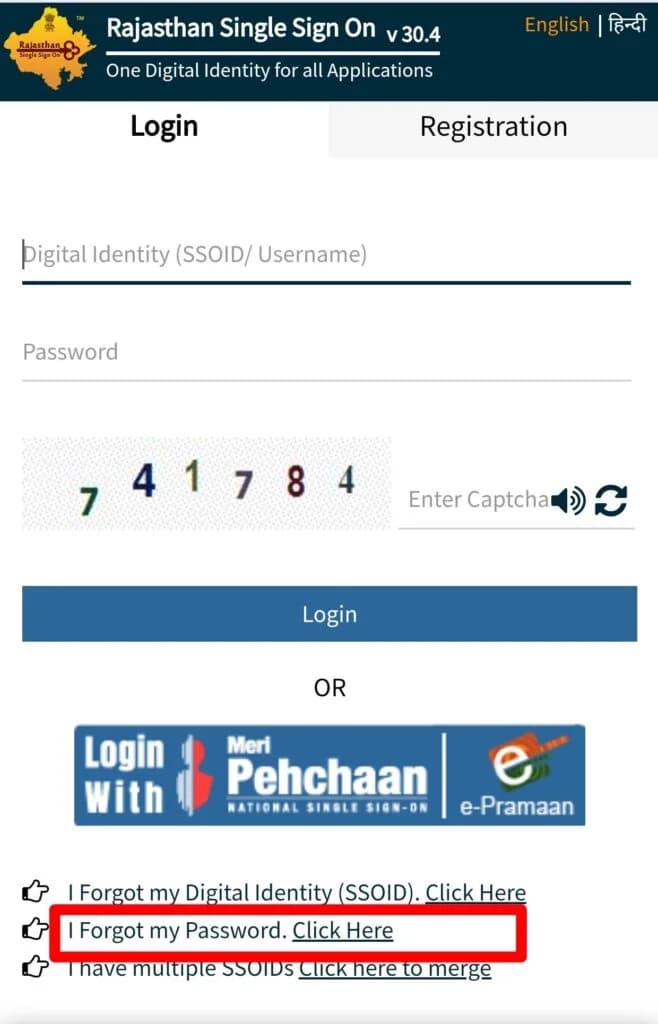
Open the official SSO portal
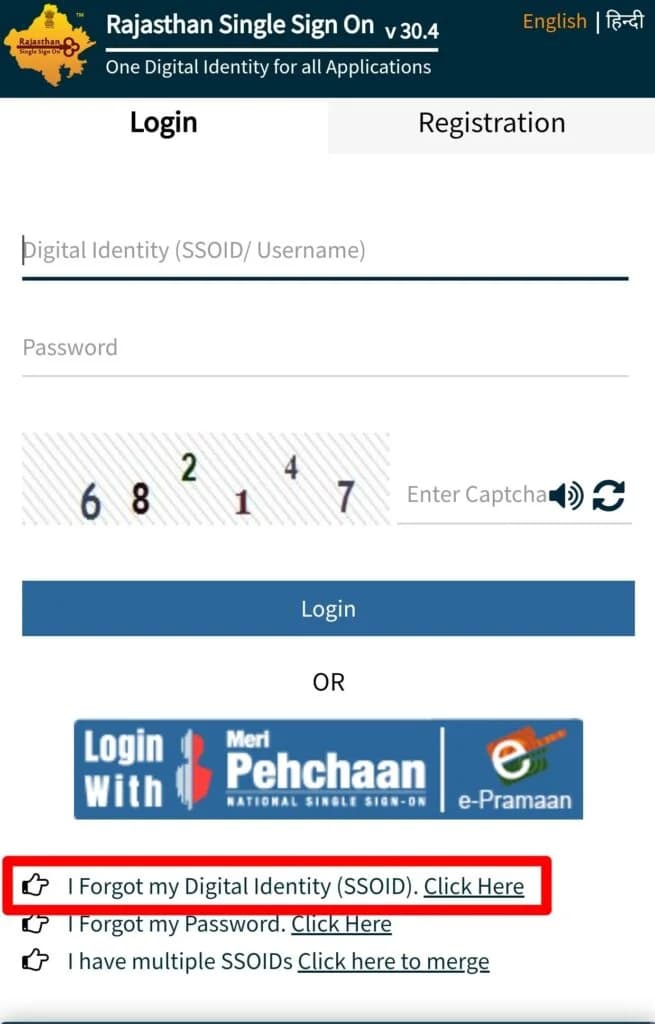
Go to sso.rajasthan.gov.in and click 'I Forgot my Digital Identity (SSOID)' below the login form.
2
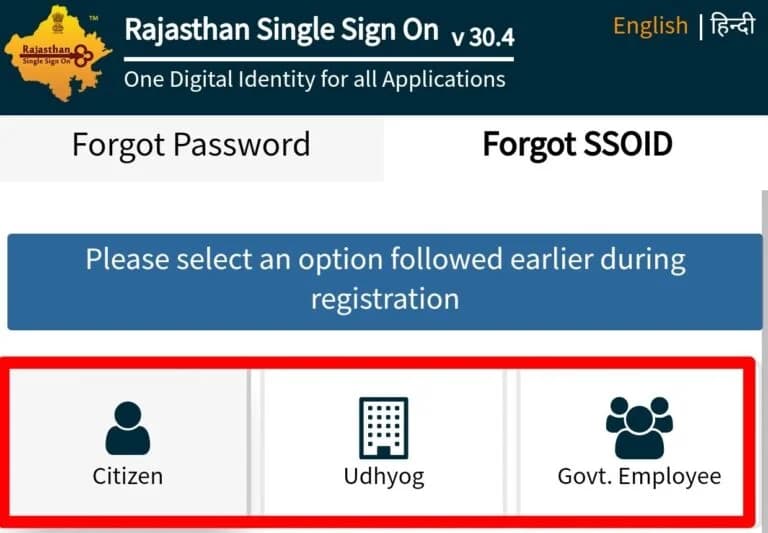
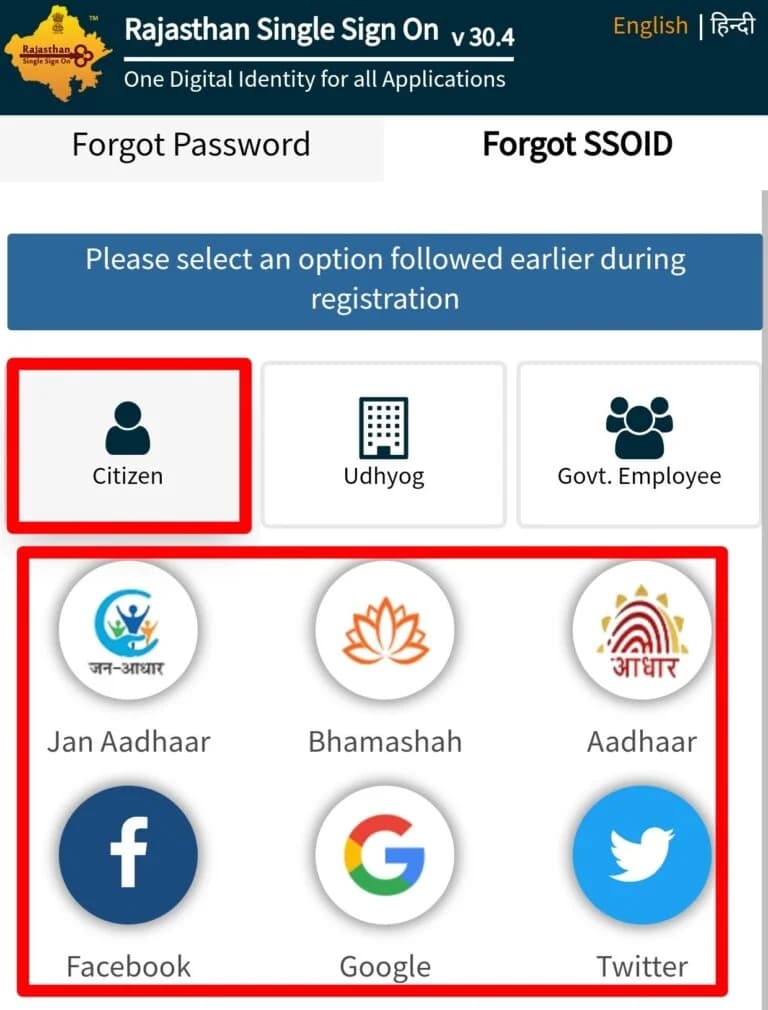
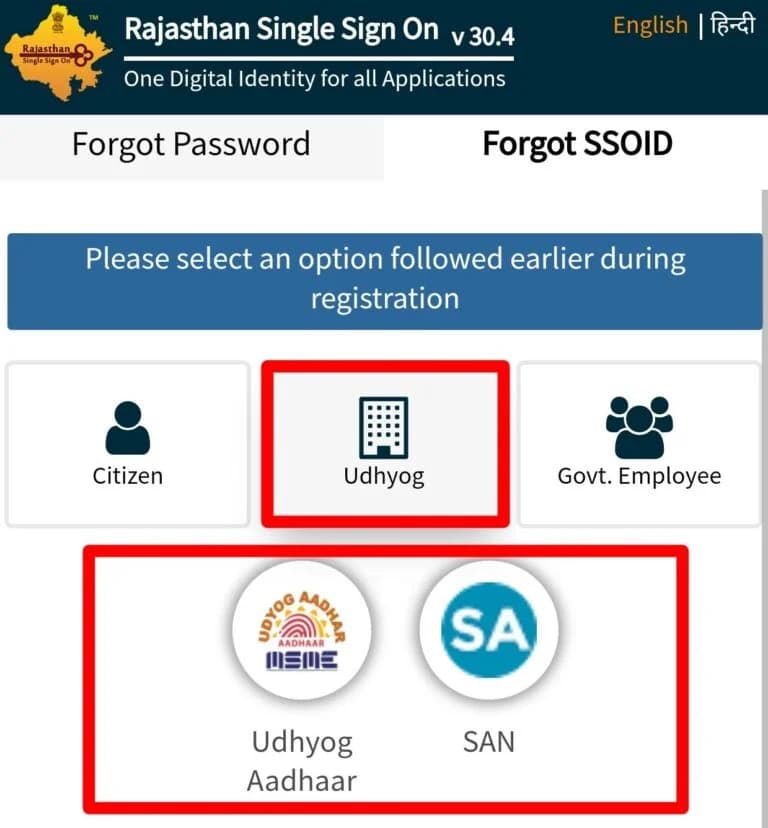
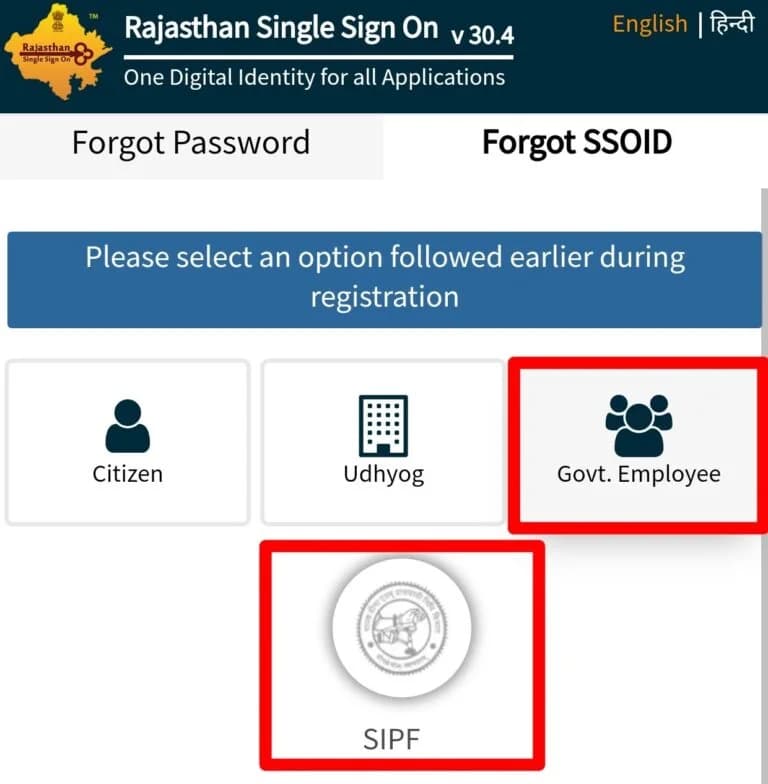
Select your registration category
Choose how you first registered — Citizen (Jan Aadhaar, Bhamashah, Aadhaar, or Google / Facebook), Udhyog (Udyog Aadhaar or SAN), or Government Employee (SIPF number and password).
3
Enter your identity details
Provide the detail for your category, such as your Aadhaar or Jan Aadhaar number, so the system can verify you.
4
Receive your SSO ID
After verification, your SSO ID is sent to your registered mobile number or email. Note it down somewhere safe.
Part 2 — Reset a forgotten password
Know your SSO ID but not your password? Reset it on the portal, or trigger recovery by SMS.
Password reset on the portal
1
Open the password reset page
Visit sso.rajasthan.gov.in and click 'I Forgot my Password' below the login form.
2
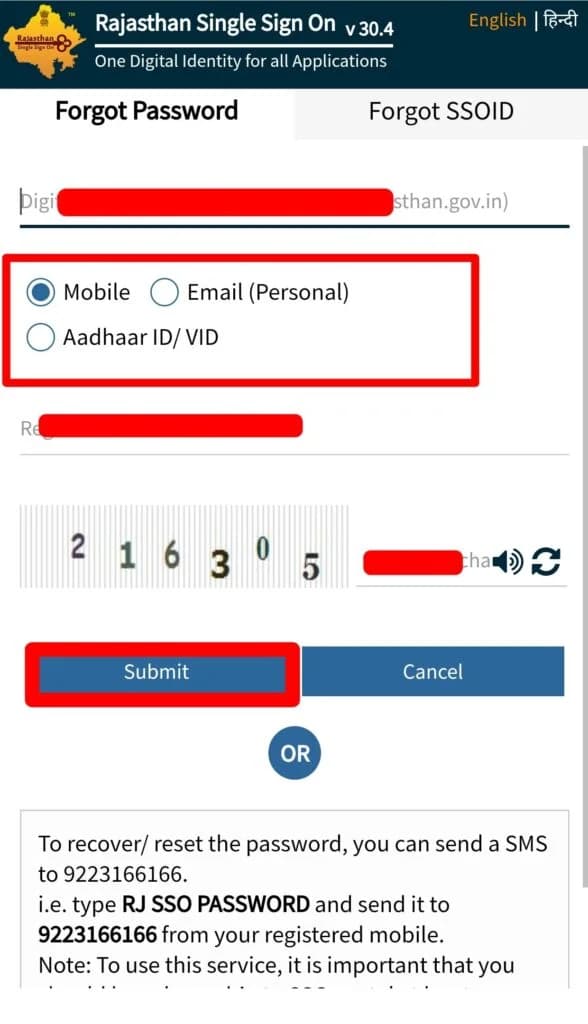
Enter your SSO ID and email
Provide your SSO ID and the email address registered with your account.
3
Choose a verification method
Verify by registered mobile (SMS link), personal email (inbox link), or Aadhaar ID / VID (uses your Aadhaar-linked mobile).
4
Open the link and set a new password
Use the link from your SMS or email to create a new, strong password. The link usually expires within 30 minutes, so act quickly.
5
Log in with the new password
Return to sso.rajasthan.gov.in and sign in with your SSO ID and the new password.
Password recovery by SMS
You can also start password recovery without the website.
SMS to send
RJ SSO PASSWORD→9223166166
Reset link not arriving?
Check your spam or junk folder, and make sure no browser extension is blocking the redirect.
Lost your registered mobile or email?
If your old SIM is deactivated or you can no longer reach the registered email, online recovery is not possible. Update your details in person at an authorised centre.
1
Visit an E-Mitra or SSO Help Centre
Find the nearest E-Mitra kiosk or official SSO Help Centre in your district. The operator can update the mobile number or email on your SSO profile.
2
Carry valid identity proof
Bring a government-issued ID — Aadhaar, Jan Aadhaar, Voter ID, or PAN card.
3
Request a contact detail update
The operator verifies your identity against the SSO profile and updates your mobile or email. Then use the standard online recovery above.
Accepted identity documents
Aadhaar Card
Jan Aadhaar Card
Voter ID Card
PAN Card
Use official channels only
Never share your SSO ID or password with any third party or unofficial agent. Approach only authorised E-Mitra kiosks or government SSO Help Centres. Recovery through official channels is always free.
SSO Helpdesk
Call 0141-5153222 or email helpdesk.sso@rajasthan.gov.in during government working hours (Monday to Friday, 10 AM to 6 PM).
Recover your SSO account
Use the forgot SSO ID or forgot password option on the official Rajasthan portal.
Update at an E-Mitra or SSO Help Centre with valid ID
Helpdesk
0141-5153222 · helpdesk.sso@rajasthan.gov.in
Cost
Free through official channels
Forgot SSO ID or password FAQ
Send the exact text RJ SSO to 9223166166 from your registered mobile number. You get your SSO ID by reply.
Send RJ SSO PASSWORD to 9223166166 from your registered mobile to start password recovery.
The SMS must be sent from the mobile number registered with your SSO account. From any other number it will not work — use the portal instead.
Visit an E-Mitra kiosk or SSO Help Centre with a valid government ID (Aadhaar, Jan Aadhaar, Voter ID, or PAN) to update your contact details, then recover online.
No. Recovery only restores access. Your application history, linked services, and saved documents stay intact.
Yes. SMS and portal recovery are free (standard SMS charges may apply). Never pay an unofficial agent.