
SSO ID Guide

Filling and Managing Your Recruitment Application

A plain-language guide to filling, editing, and viewing your recruitment application on the Rajasthan Recruitment Portal, plus where to get help.

This page answers common questions candidates have while filling and managing their recruitment application on the Rajasthan Recruitment Portal — from submission guidelines and editing rules to viewing the form after submission and getting help.

Common questions about the application

Guidelines to follow during application submission

During the application process, candidates are advised to carefully read the Candidate Help Document, the One Time Registration (OTR) Help Document, and the One Time Document Verification Document before submitting the application. Candidates may refer to these help documents for guidance in the 'Notification' section of the 'Notice Board' on the Recruitment Portal.

The links to these help documents are available on the official website. Following the instructions provided in these documents will help avoid any errors during the application process.
How to edit your application form

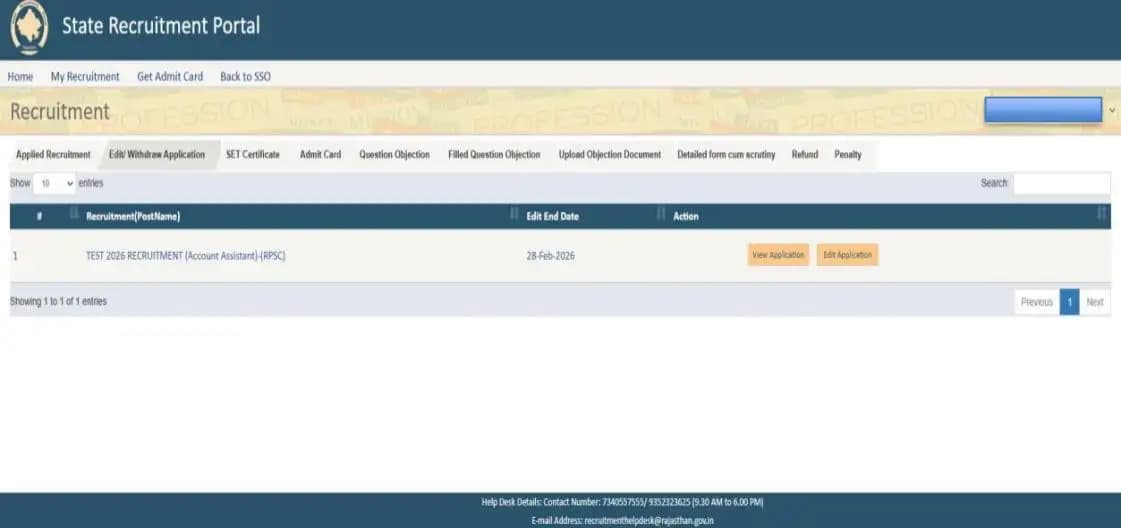
Candidates may edit their application form only if the edit window is enabled by the department. During this period, modifications are permitted strictly for the fields specified by the recruiting agency, and only within the duration for which the edit window remains open.

How to edit your application form

Where to get help during the application process

For any technical issues related to the Recruitment Portal, candidates may contact the helpdesk using the details below:

  • Helpline Numbers: 9352323625 / 7340557555
  • Email ID: recruitmenthelpdesk@rajasthan.gov.in

Candidates are advised to send a clear and complete email to the official Helpdesk with the following details to ensure quick resolution:

Email to: recruitmenthelpdesk@rajasthan.gov.in

Subject: Brief description of the issue (e.g., "OTR KYC Pending – SSO ID: XXXXX")

The email body should include:

  • Candidate Name
  • SSO ID
  • OTR Number (if available)
  • Registered Mobile Number
  • Registered Email ID
  • Type of Issue (issue related to OTR, Document Details section, Application form, Scrutiny Form, Question Objection, Edit of Application form, Admit Card, etc.)
  • Name of Recruitment (if applicable)
  • Clear description of the issue
  • Screenshots of the related issue

Incomplete emails may delay resolution.

Where to view your submitted application form

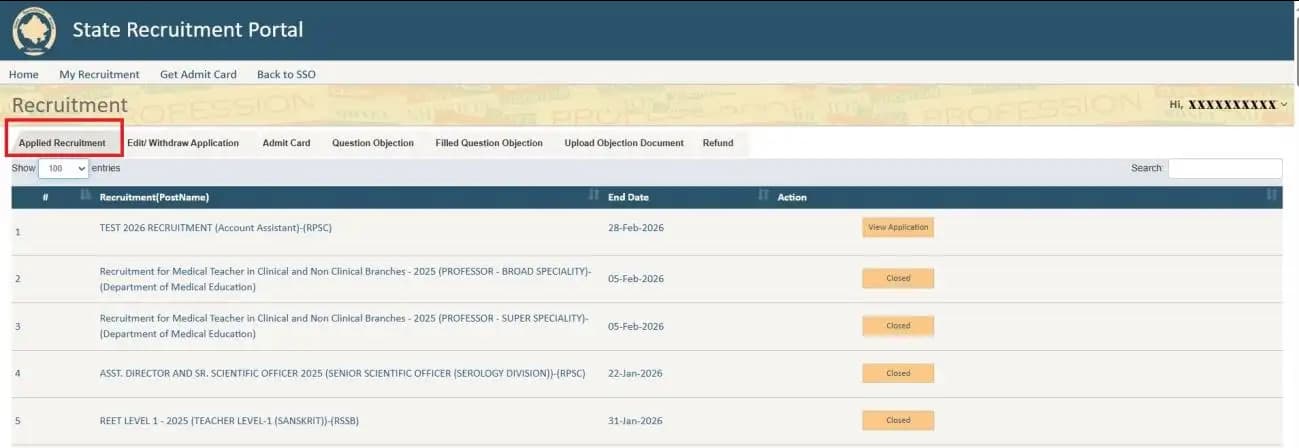
If the candidate has successfully submitted the application form and the application number has been generated, then the candidate can view the filled application form by following these steps:

  • Log in to your SSO ID.
  • Click on the Recruitment Portal.
  • Go to the My Recruitment section.

All the application forms filled by the candidate will be available there. The candidate can click on the View Application button to see the submitted application form.

Where to view your submitted application form

"Closed" showing next to a recruitment name

If "Closed" is displayed in front of the recruitment name, it means that you started filling out the application form but did not complete it fully or did not finally submit it.

An Application Number is generated only after the application form is successfully Final Submitted. Once the Application Number is generated, the "View Application" option becomes available in front of the recruitment name.

Ready to fill your application?

Fill, submit, and manage your recruitment application on the official Rajasthan Recruitment Portal.